

Using ChatGPT as a travel planner can be incredibly powerful — but most people do it wrong. They type “plan my trip to Paris” and get a generic list of attractions from any travel blog.
In this ChatGPT travel planner guide, I’ll show you how to get genuinely useful responses, share prompts that work, and reveal when dedicated AI tools beat ChatGPT (and vice versa).

Why Use ChatGPT as Your Travel Planner?
ChatGPT has one major advantage over dedicated tools like Layla AI or Mindtrip: flexibility.
Dedicated travel planners excel at specific tasks — Layla books flights, Mindtrip visualizes on maps. But they can’t:
- Answer “Do I need a visa for Morocco with a Ukrainian passport?”
- Explain how Milan’s metro payment system works
- Create a custom packing list for a winter trip with a toddler
- Compare train vs rental car for your specific route
- Translate a restaurant menu and explain the dishes
ChatGPT handles all of this. It’s your Swiss Army knife for travel.
The other advantage: ChatGPT already knows you.
If you use ChatGPT daily, it knows your preferences, dietary restrictions, travel style, and interests. A dedicated planner starts from zero. ChatGPT starts from understanding you prefer quiet cafes over crowded tourist spots.
The Problem: Surface-Level Responses
Here’s what happens when most people use ChatGPT for travel planning:
❌ Bad prompt:
Plan a 3-day trip to Rome
❌ Generic response:
Day 1: Colosseum, Roman Forum, Palatine Hill Day 2: Vatican City, St. Peter’s Basilica, Sistine Chapel Day 3: Trevi Fountain, Spanish Steps, Pantheon…
This is useless. It’s the same list from any “Top 10 Rome Attractions” article.
No timing. No logistics. No restaurants. No context for YOUR trip.
ChatGPT Travel Planner: 5 Techniques for Better Responses
Technique 1: Add Context & Constraints
✅ Good prompt:
Plan a 3-day trip to Rome. Traveling with my wife and 7-year-old daughter. We arrive at Fiumicino at 2pm on Friday, leave Monday at 10am. Staying near Termini station.
Interests: history (but kid-friendly), good food (no seafood), avoiding crowds. Budget: moderate.
We’ve already been to the Colosseum on a previous trip.
Why this works:
- Specific dates → ChatGPT plans around arrival/departure
- “7-year-old daughter” → filters out wine bars, adds kid-friendly options
- “No seafood” → restaurant recommendations make sense
- “Already been to Colosseum” → skips the obvious
Technique 2: Ask for Reasoning
✅ Prompt:
For each recommendation, explain WHY it’s good for our specific situation (family with young child, avoiding crowds).
This ChatGPT travel planner technique forces it to think instead of listing:
“I’m suggesting Borghese Gardens for Sunday morning because locals visit then — tourists are at the Vatican. Your daughter can rent a rowboat while you enjoy the view.”
Technique 3: Request Specifics
❌ Vague:
Recommend some restaurants
✅ Specific:
Recommend 3 restaurants near Trastevere for dinner with a 7-year-old. Requirements: outdoor seating, pasta dishes, not touristy, under €50 for two adults + child. Give exact names, addresses, and what to order.
Technique 4: Chain Your Questions
Don’t try to get everything in one prompt. Build the conversation:
- “Plan our 3 days in Rome” → Get the framework
- “For Day 1, what’s the best order to minimize walking?” → Optimize logistics
- “What time should we arrive at the Vatican to avoid crowds?” → Get specific timing
- “What should we eat for lunch near Vatican? Quick but not McDonald’s” → Fill in details
- “If it rains on Day 2, what’s our backup plan?” → Handle contingencies
Technique 5: Role Assignment
✅ Prompt:
Act as a local Roman who has lived in the city for 20 years and has a young child. Plan our 3-day trip focusing on places you’d actually take YOUR family — not tourist traps.
This ChatGPT travel planner trick shifts the AI from “tour guide mode” to “local friend mode.”
ChatGPT Travel Planner: Free vs Plus Comparison
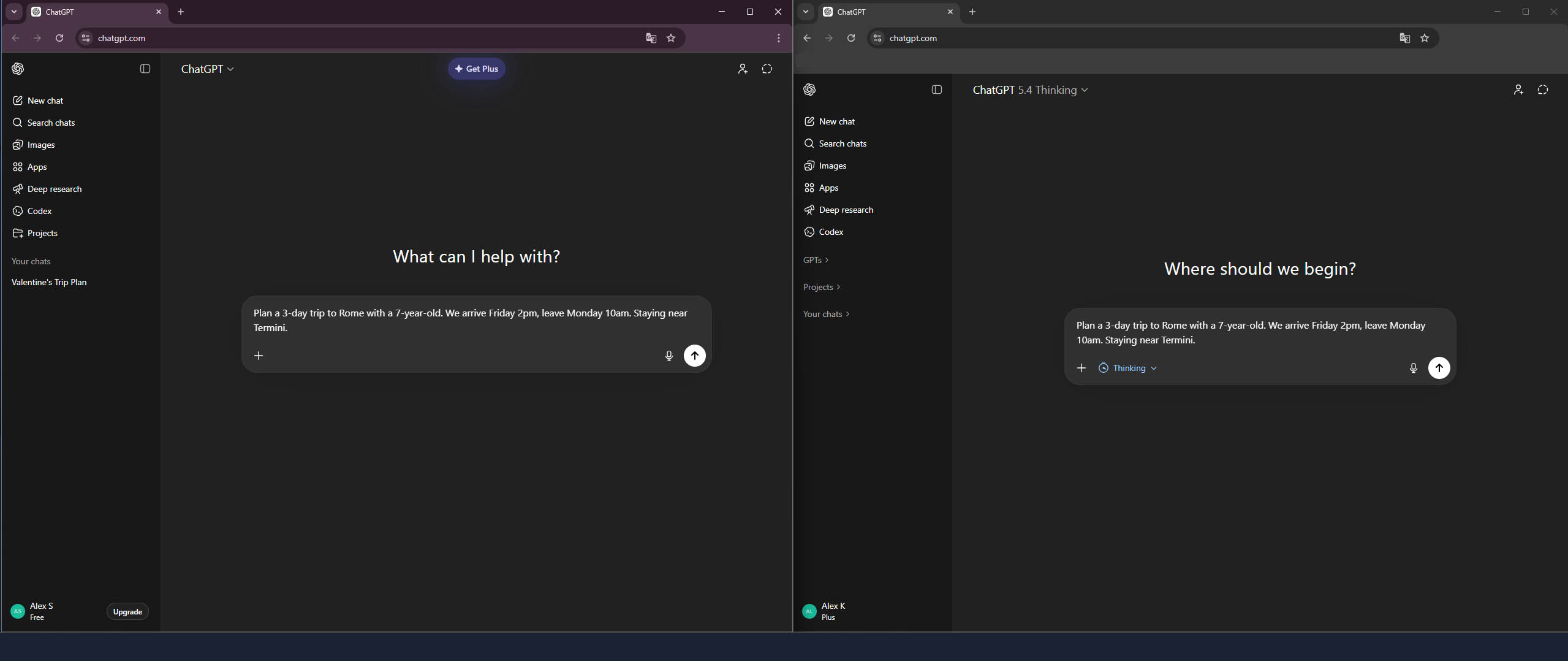
I tested both Free and Plus versions of ChatGPT on identical travel planning prompts. Here’s what I found:
Test 1: Itinerary Planning
Prompt:
Plan a 3-day trip to Rome with a 7-year-old. We arrive Friday 2pm, leave Monday 10am. Staying near Termini.
| Aspect | Free (GPT-4o) | Plus (GPT-5.4 Thinking) |
|---|---|---|
| Speed | ~15 seconds | ~2 minutes |
| Images | Many | Several |
| Sources | None | ✅ Official site links |
| Specific restaurants | ✅ Names, addresses | Less specific |
| Budget estimate | €450-600 | Not calculated |
| Vatican on Sunday | Included in plan 😬 | ⚠️ Warned it’s closed! |
| Opening hours | Not verified | ✅ Checked (Colosseum 8:30) |
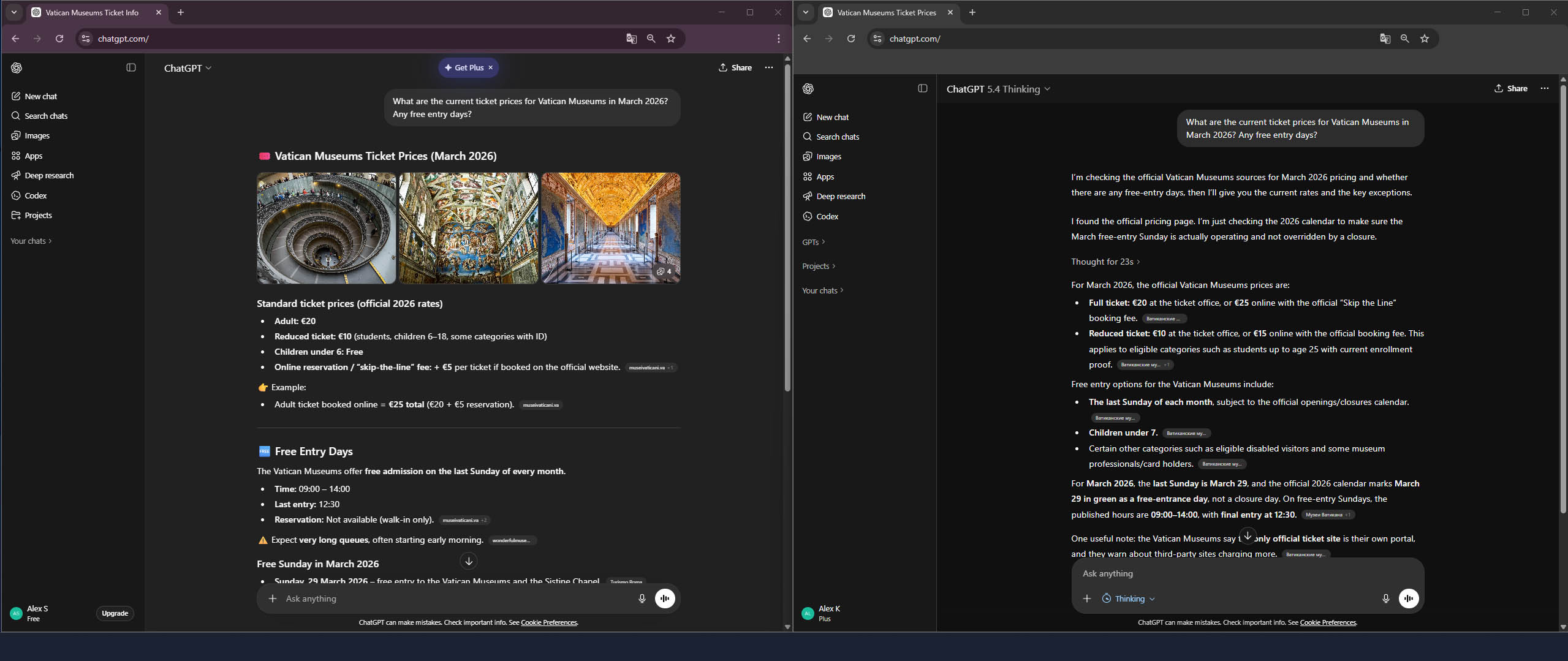
Verdict: Free is faster with more specific details, but Plus verifies current data and warns about real constraints. Free suggested Vatican on Sunday, even though museums are closed (except the last Sunday of each month)!
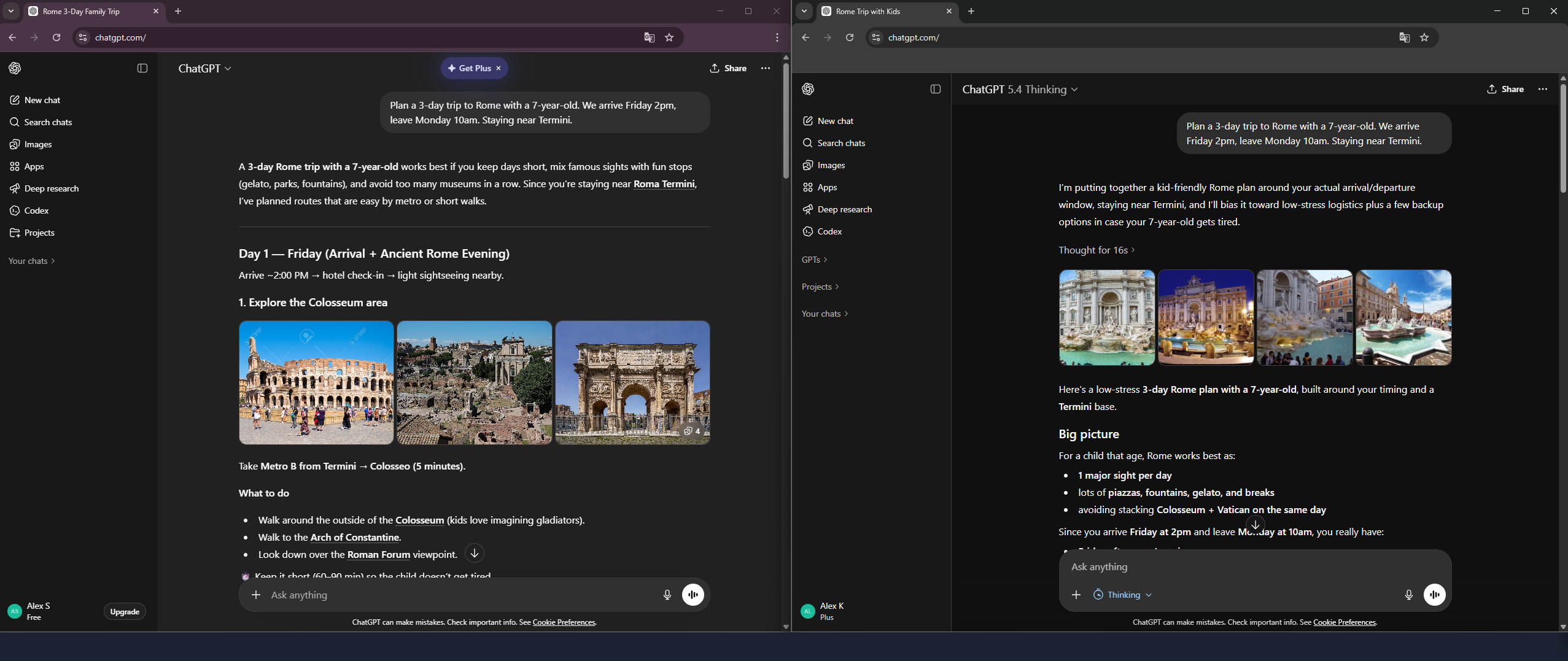
Test 2: Current Prices
Prompt:
What are the current ticket prices for Vatican Museums in March 2026? Any free entry days?
| Aspect | Free | Plus |
|---|---|---|
| Ticket price | €20 (€25 online) ✅ | €20 (€25 online) ✅ |
| Free Sunday | March 29 ✅ | March 29 ✅ |
| Hours | 09:00-14:00 ✅ | 09:00-14:00 ✅ |
| Sources | museivaticani.va | museivaticani.va |
| Scam site warning | ❌ | ✅ |
Verdict: Both performed equally well on this query — Free also has web search and provides accurate data with sources.
Which Version Should You Use?
| Use Case | Free | Plus |
|---|---|---|
| Quick answers, restaurant names | ✅ | |
| Verifying hours and restrictions | ✅ | |
| Current prices | ✅ | ✅ |
| Complex multi-city planning | ✅ |
My ChatGPT travel planner recommendation: Free is sufficient for most travel questions. Plus ($20/month) is worth it for complex trips where accuracy matters.
Ready-to-Use ChatGPT Travel Planner Prompts
For Itinerary Planning:
Planning a trip to [destination] from [dates]. Traveling with [who].
Staying at [area/hotel]. Arriving via [transport] at [time], departing [time].

Interests: [specific interests]
Avoid: [what you don't want]
Budget: [range]
Already seen: [if returning]

Create a day-by-day itinerary with:
- Specific timing (when to arrive at each place)
- Meal recommendations with restaurant names
- Transportation between locations
- One backup option per day if weather is bad
For Logistics:
Flying into [airport] and need to get to [destination].
Options seem to be [list what you've found].

Compare these for: cost, time, convenience with [luggage/kids/etc].
Which would you recommend and why?
For Local Tips:
Visiting [city] for [duration]. What do tourists always get wrong
about this place? What do locals do differently? Give me 5 specific
tips that aren't in typical travel guides.
For Packing:
Create a packing list for [destination] in [month]. Trip length: [days].
Activities planned: [list].
I tend to overpack — keep it minimal but complete.
Format as a checklist I can print.
For Budget:
Estimate daily costs in [destination] for [who]:
- Accommodation ([type] level)
- Food (breakfast, lunch, dinner)
- Transportation
- Activities/entrance fees

Give me a realistic range, not just averages.
What's the easiest way to save money without sacrificing experience?
When ChatGPT Beats Dedicated Travel Planners
Use ChatGPT for:
| Task | Why ChatGPT Wins |
|---|---|
| Complex questions | “Do I need a visa?” — no travel app answers this |
| Custom lists | Packing, budget, phrases to learn |
| Logistics | Train vs car, airport transfers, payment systems |
| Contingency planning | “What if it rains?” |
| Local knowledge | Tipping customs, dress codes, scams to avoid |
| Personalization | Uses your history, remembers preferences |
When Dedicated Tools Are Better
Use Layla AI / Mindtrip / Wanderlog for:
| Task | Why Dedicated Tools Win |
|---|---|
| Booking flights | Real prices, real tickets (Layla) |
| Visual map planning | See your itinerary on a map (Mindtrip, Wanderlog) |
| Group collaboration | Share and edit with travel companions |
| Current prices | Live hotel/attraction prices |
| Offline access | Download your trip (Wanderlog) |
My workflow:
- ChatGPT → Initial research, visa questions, logistics, custom lists
- Mindtrip → Visualize and refine the itinerary on a map
- Layla AI → Book flights and hotels with real prices
Common ChatGPT Travel Planner Mistakes
❌ Asking for “the best”
“What’s the best restaurant in Paris?”
There’s no “best” — only best for YOUR situation. Add constraints.
❌ One-shot prompts
Don’t expect one prompt to plan your entire trip. Iterate.
❌ Not verifying critical info
ChatGPT has a knowledge cutoff. Always verify:
- Visa requirements → Official embassy website
- Opening hours → Google Maps or official site
- Prices → Official booking sites
- Events/closures → Recent sources
❌ Ignoring web search
With ChatGPT Plus, enable web browsing for current information:
“Search for current entry requirements for [country] for [passport] holders”
Field test: Rome, October 2026
On a real family trip to Rome in October 2026, free ChatGPT with web search was the most accurate of the nine planners I tested — a clear change from our March test above, where the free version missed the Vatican’s Sunday closure. It knew right away that Sunday, October 4 was a free Sunday at the Colosseum, that the free tickets are handed out at the box office in order of arrival, and that the Vatican Museums are closed on Sundays. It planned around our 5:05 p.m. landing. Where it slipped was money: it put the taxi from Fiumicino to our hotel at €50–60; we paid €65.59 in, and €65.95 back.
As a control, I also ran my own paid ChatGPT. It added the restored national holiday and weekend rail works, and it nailed the airport taxi range. The free version was good enough for the facts that mattered.
The full test: AI Rome Itinerary Test.
The Bottom Line
This ChatGPT travel planner guide shows that ChatGPT is the most flexible AI travel tool available — if you know how to use it.
Key principles:
- Add context and constraints
- Ask for reasoning, not just lists
- Be specific about what you want
- Build your plan through conversation
- Verify critical information externally
For booking and visualization, use dedicated tools. For everything else — research, logistics, customization, complex questions — the ChatGPT travel planner approach is unbeatable.
Free vs Plus: Free works for most travel planning. Plus ($20/month) is worth it for complex trips requiring verified data.
Rating: 4.5/5 — Essential tool in your travel planning stack
Related:
→ AI Rome Itinerary Test: 9 Planners vs. a Real Family Trip
→ Best AI Trip Planners 2026: 10 Tools Honestly Compared
→ Mindtrip Review 2026: Honest Test on a Real Family Trip
→ AI Travel Planning: Ultimate Beginner’s Guide 2026
→ 7 AI Trip Planners on a Real Milan & Lake Como Trip: What Held Up (2026)
Last updated: March 2026; Rome, October 2026. Tested with ChatGPT Free and Plus on real travel planning scenarios.