
AI has changed how we plan trips. Instead of hours on Google and Reddit, you can get a personalized itinerary in minutes.

But where do you start? This AI travel planning guide will show you:
- What types of AI tools exist for travelers
- How to choose the right one for your task
- Step-by-step process for planning with AI
- Common mistakes to avoid
Why Use AI for Travel Planning?
Time savings. What used to take days — research, comparing hotels, building itineraries — now takes hours.
Personalization. AI considers your preferences: budget, interests, who you’re traveling with, dietary restrictions. No more generic “Top 10 places” lists.
Current information. Modern AI travel planning tools search the web and provide fresh data on prices, opening hours, and temporary closures.
Flexibility. Plans changed? AI rebuilds your itinerary in seconds.
Types of AI Travel Planning Tools
Not all AI travel tools are the same. Here are the main categories:
1. General-Purpose Chatbots (ChatGPT, Claude)
What they are: Universal AI assistants that can answer any question.
Strengths:
- Answer complex questions (“Do I need a visa?”, “How does Milan’s metro work?”)
- Create custom lists (packing list, budget, local phrases)
- Remember conversation context and your preferences
- Free versions available
Weaknesses:
- Don’t book tickets directly
- No map visualization
- Require good prompts for quality responses
Best for: Research, logistics, unusual questions.
→ Deep dive: ChatGPT Travel Planner: Prompts That Actually Work
2. Dedicated AI Travel Planners (Mindtrip, Layla AI, Wanderlog)
What they are: Tools built specifically for trip planning.
Strengths:
- Visual itinerary on a map
- Booking integration (hotels, tickets)
- Ready-made templates and suggestions
- Group planning (share with travel companions)
Weaknesses:
- Less flexibility for unusual questions
- Some features are paid
Best for: Visual planning, booking, group trips.
→ Deep dive: Best AI Trip Planners 2026: 10 Tools Compared
3. Messenger Bots (GuideGeek)
What they are: AI bots that work through WhatsApp, Instagram, Messenger.
Strengths:
- No app download needed
- Quick answers on the go
- Convenient during your trip
Weaknesses:
- Limited features compared to full planners
- No visualization
Best for: Quick questions while traveling, spontaneous recommendations.
Step-by-Step AI Travel Planning Guide
Step 1: Define Your Trip
Before opening any AI tool, answer these questions:
- Where? One country or multiple?
- With whom? Solo, couple, family with kids, group of friends?
- How many days?
- Budget? Backpacker, moderate, luxury?
- Interests? Culture, nature, food, adventure, relaxation?
This information becomes the foundation for your AI prompt.
Step 2: Choose the Right Tool for Your Task
| Task | Best Tool |
|---|---|
| Initial research, visas, logistics | ChatGPT / Claude |
| Visual itinerary on a map | Mindtrip |
| Booking flights and hotels | Layla AI |
| Offline access to itinerary | Wanderlog |
| Quick question via WhatsApp | GuideGeek |
| Complex multi-city flights | iMean AI |
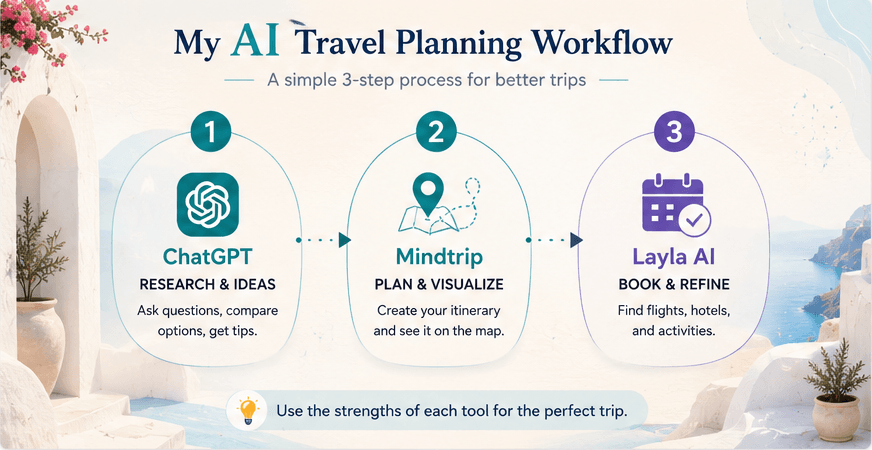
You don’t have to choose just one. Many travelers use a combination:
My AI travel planning workflow:
- ChatGPT → Initial research, visa questions, logistics
- Mindtrip → Visualize itinerary on map, refine
- Layla AI → Book with real prices
Step 3: Give AI the Right Context
The biggest mistake beginners make is overly generic prompts.
❌ Bad:
Plan a trip to Italy
✅ Good:
Plan a 7-day trip to Italy. Traveling with my wife, late September. Flying into Rome, out of Milan. Moderate budget. Interests: food, wine, history. Want to visit Rome, Florence, and Lake Como. Traveling by train.
More context = better results.
What to include in your AI travel planning prompt:
- Dates and duration
- Number and type of travelers
- Budget
- Interests and preferences
- Restrictions (dietary, mobility, etc.)
- What you’ve already seen (if returning)
Step 4: Iterate and Refine
AI travel planning is a conversation, not a one-shot request.
After the first response, ask follow-ups:
- “Add more restaurants with local cuisine”
- “Day 3 is too packed, redistribute activities”
- “What if it rains that day?”
- “What time should we arrive at the Vatican to avoid crowds?”
Each refinement makes your plan better.
Step 5: Verify Critical Information
AI is powerful but not infallible. Always verify:
| What to Check | Where |
|---|---|
| Visa requirements | Official embassy website |
| Opening hours | Google Maps, official site |
| Ticket prices | Official attraction website |
| Hotel bookings | Booking.com, official site |
| Current events/closures | Recent news |
Common AI Travel Planning Mistakes
❌ Expecting a perfect plan from the first prompt
AI is a co-pilot, not autopilot. Best results come through iteration.
❌ Not providing context
“Plan a trip to Paris” gives generic results. Add details.
❌ Blindly trusting everything
AI can make mistakes on prices, hours, even whether places exist. Verify what matters.
❌ Using only one tool
Different tools excel at different tasks. Combine them.
❌ Ignoring web search
In ChatGPT Plus and other paid versions, enable web search for current information.
What’s Next?
Now you know the basics of AI travel planning. Here are your next steps:
Choose a tool and try it:
Go deeper on specific tools:
- → ChatGPT Travel Planner: Prompts That Actually Work
- → Mindtrip Review 2026
- → Best AI Trip Planners 2026: 10 Tools Compared
The main rule: Start small. Plan a weekend trip or a day excursion. Get a feel for how AI travel planning works, then tackle complex itineraries.
AI doesn’t replace the joy of travel — it removes the planning busywork so you can focus on the experiences.
→ ChatGPT Travel Planner 2026: Prompts That Actually Work
→ Best AI Travel Planners 2026: 10 Tools Compared
→ France Road Trip with AI: Family Travel Experience
Last updated: March 2026